

AvailableRevot Co., Ltd. (株式会社revot)
GhostMove for iPhoneYou decide which location your apps see.
GhostMove for iPhone changes your iPhone's location at the OS level. Maps, the location saved in photos, social apps and every other app on the phone see the same position.
Installing it needs a Mac and a USB cable. Day to day, you change the location on the iPhone alone. An app installed with a free Apple ID stops opening after 7 days, so every 7 days you connect the iPhone to the Mac and run the setup tool again to extend it.
Not on the App Store. Prices are shown on the purchase page.
- Requires
- iOS 17.4 or later
- Install
- A Mac and a USB cable. Renew every 7 days
- Daily use
- iPhone alone
01 / SETUP
Install from a Mac, then renew every 7 days
Installing needs a Mac (macOS) and a USB cable. You put the setup tool, GhostMove Setup, on the Mac, connect the iPhone, and install GhostMove on it, signed with your own Apple ID (a free one is fine). The work on the Mac takes about 10 minutes. GhostMove Setup runs on a Mac only; the Windows version is in preparation.
You also install LocalDevVPN (Coxson Engineering LLC), a free app from the App Store, on the iPhone and connect it. It is a VPN that stays inside the iPhone, which GhostMove uses to talk to the iPhone itself.
Install and renew
On a Mac
Install over USB from a Mac (macOS). With a free Apple ID, connect again every 7 days to renew.
Daily use (between renewals)
iPhone alone
- No USB cable
- No Mac
- No jailbreak
Renewing every 7 days
An app installed with a free Apple ID stops opening after 7 days; this is Apple's rule. Before then, connect the iPhone to the Mac and run GhostMove Setup again to extend it, keeping your data and settings. If you install with an Apple ID enrolled in the Apple Developer Program, the period is 1 year.
It changes the iPhone's location. It does not change the Mac's own location.
02 / HOW IT WORKS
Not app by app: it changes the iOS location
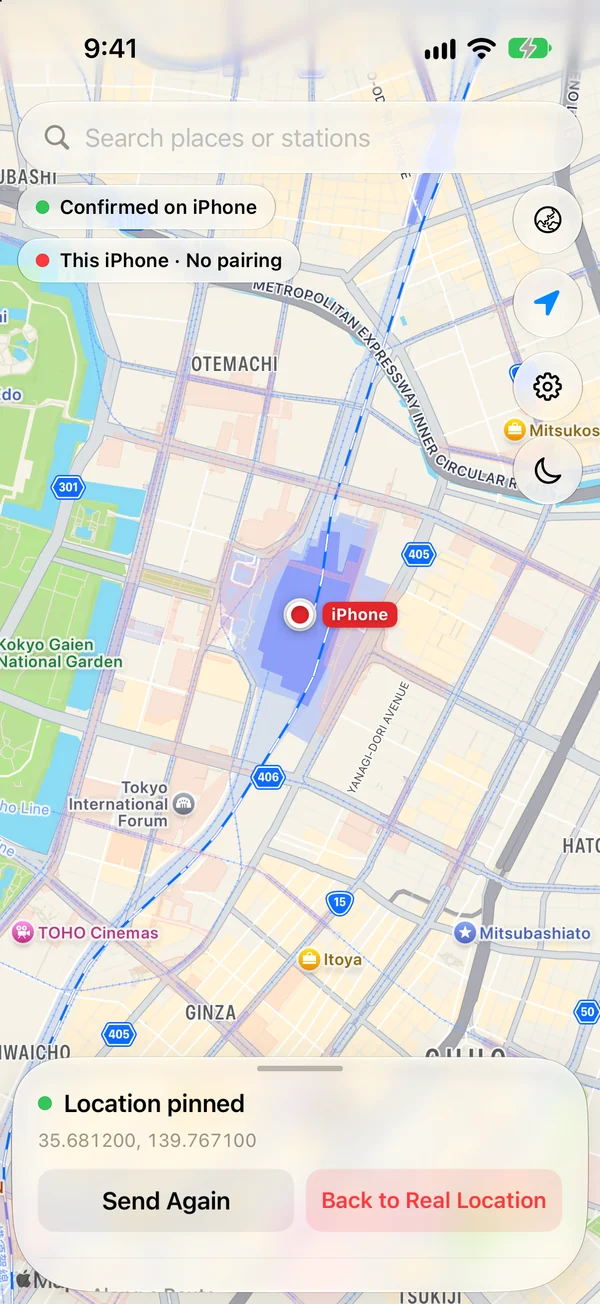
GhostMove changes the iPhone's location at the OS level. That is why every app on the phone sees the same position.
03 / FEATURES
What it does
Fix the location on a spot
Pick a spot on the app's map (Apple Maps), or search by place name, and fix the location there.
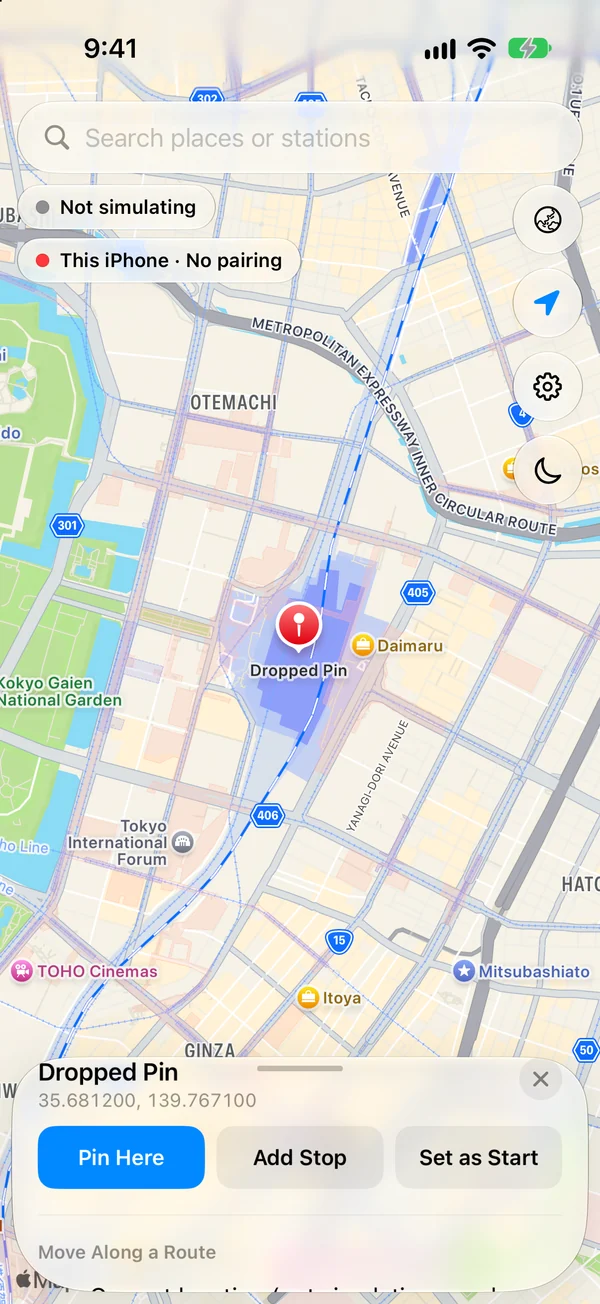
Tap a spot on the mapA pin drops and its coordinates appear. You can also search by place or station name in the box above. 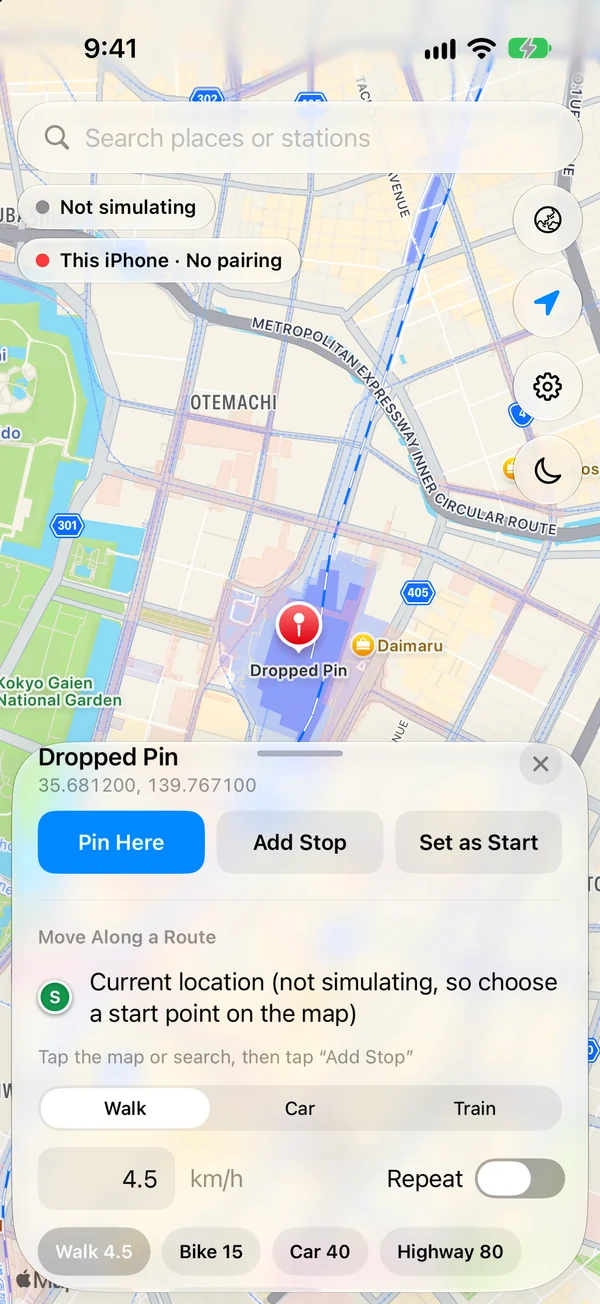
Pull up the panel and tap “Pin Here”“Add Stop” and “Set as Start” use the spot for a route. Move along a route
Choose a walking, driving or train route and move along it at a set speed. While moving, you can pause, resume and change the speed.
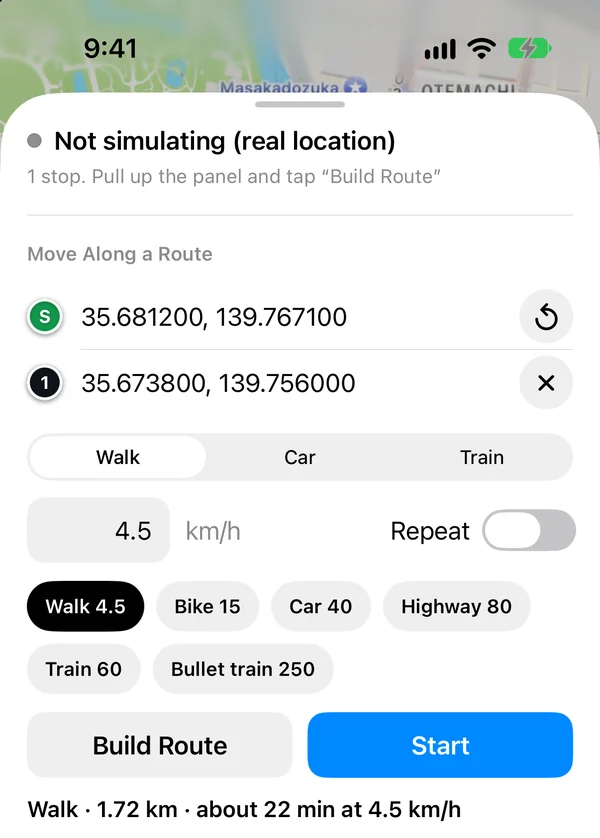
Set the start, destination, mode and speedChoose Walk, Car or Train, tap “Build Route” to see the distance and time, then tap “Start”. 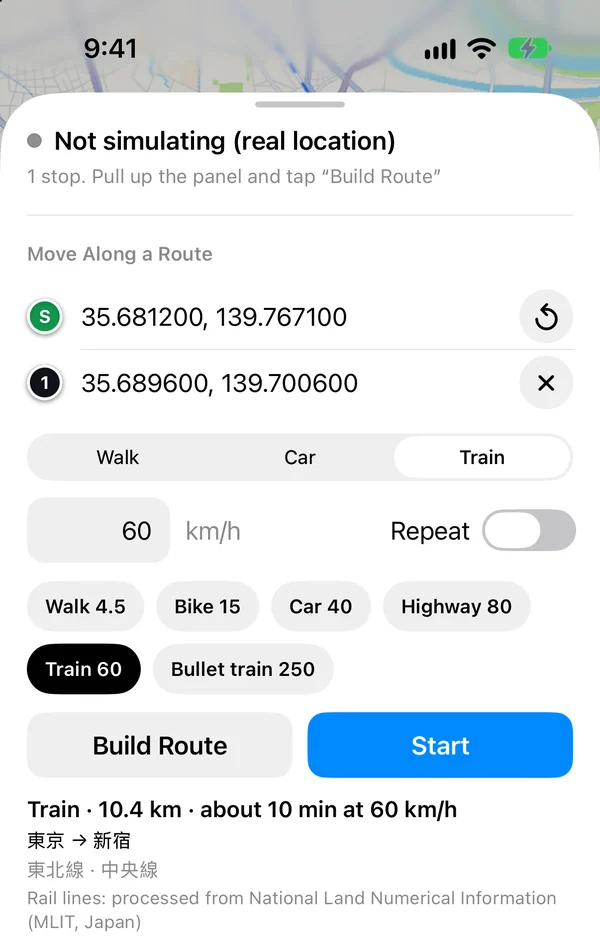
A train routeThe stations and lines are shown, as in “東京 → 新宿”. Train routes work in Japan only. Stop, or go back to the real location
Stop where you are and stay there, or go back to your real location.
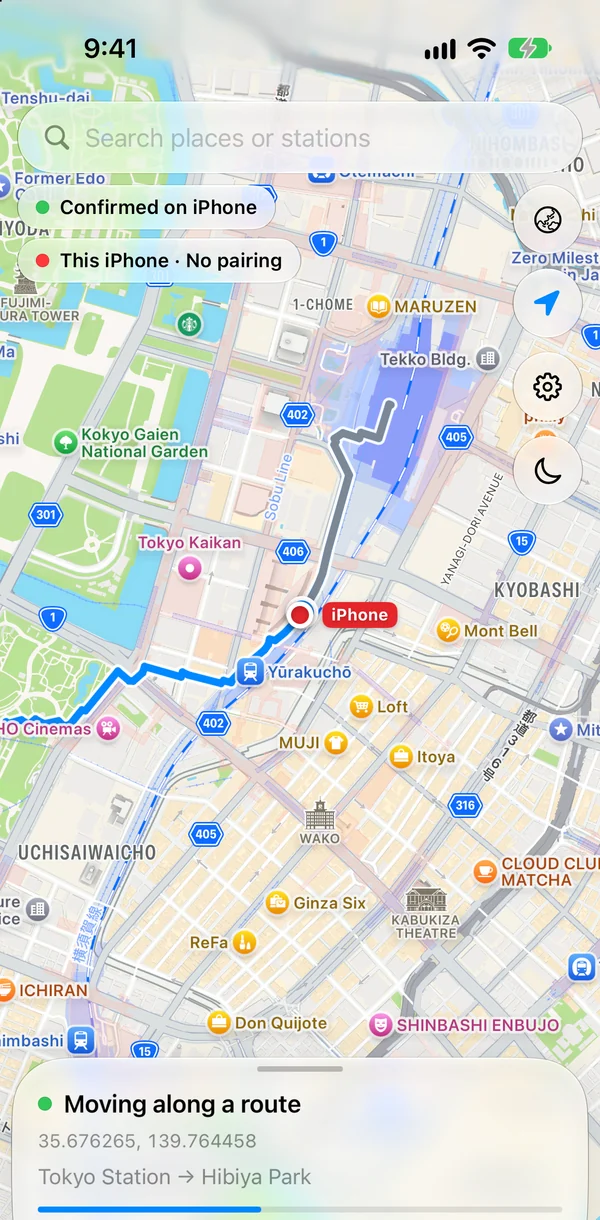
Moving along the routeThe red “iPhone” marker moves along the route. The part already covered turns gray. 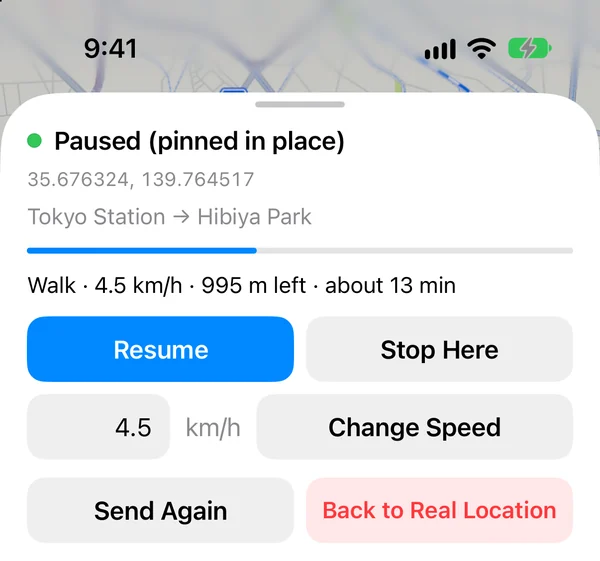
Controls while paused“Resume” moves on and “Stop Here” stays where you are. “Change Speed” sets a new speed. “Back to Real Location” returns to your real location. The location stays
The location stays after you close the app, lock the phone or switch networks. After a route is sent, the iPhone moves along it on its own.
Train routes use Japan's rail network data, so they work in Japan only. Walking and driving routes work wherever Apple Maps has directions.
04 / NETWORK
Sending a new location needs a non-cellular connection for a few seconds
Because of an iOS restriction, sending a new location needs a connection other than cellular for a few seconds: Wi-Fi, tethering, or airplane mode for a few seconds. If cellular alone cannot send it, the app tells you, and it tells you again once the location has been sent.
- Airplane mode onNot needed if you use Wi-Fi or tethering.
- Send the locationThe app sends the place or route you chose beforehand.
- Airplane mode offThe location stays as it is.
Put airplane mode on, the GhostMove action and airplane mode off into one shortcut, and the three steps run with one tap.
For a route that takes many hours, the app sends the next part along the way, and that also needs a non-cellular connection.
05 / USE CASES
Where it is useful
Privacy
When you do not want your real location in the location data apps receive, or in the location saved in photos you share.
Testing location-based apps
When you want to check how an app that uses location behaves at different places.
Checking another city
When you want to see how apps look and behave in another city.
06 / REQUIREMENTS
Requirements and conditions
| OS | iOS 17.4 or later |
|---|---|
| Developer Mode | Must be on |
| Needed to install | A Mac (macOS), a USB cable, and your own Apple ID (a free one is fine) |
| Windows | The setup tool runs on a Mac only. The Windows version is in preparation |
| Renewal every 7 days | Apps installed with a free Apple ID stop opening after 7 days. Before then, connect the iPhone to the Mac and run GhostMove Setup again; your data and settings stay. With an Apple ID enrolled in the Apple Developer Program, the period is 1 year |
| LocalDevVPN | A free app from the App Store (Coxson Engineering LLC). A VPN that stays inside the iPhone, which GhostMove uses to talk to the iPhone itself. You need to install it and connect it |
| Daily use | iPhone alone, between renewals. No USB cable, no Mac, no jailbreak |
| When sending a location | Wi-Fi, tethering, or airplane mode for a few seconds |
| Train routes | Japan only (uses Japan's rail network data) |
| Walking and driving routes | Wherever Apple Maps has directions |
| Availability | Not on the App Store. Buy on the purchase page |
| Price | monthly ¥1,980, 3-month ¥3,980, yearly ¥7,980, lifetime ¥12,800 (tax included) |
| Developer | ilando LLC |
| Seller | Revot Co., Ltd. |
07 / FAQ
Frequently asked questions
Is it a Mac app?
No. It is an iPhone app. But installing it needs a Mac (macOS) and a USB cable. The setup tool, GhostMove Setup, runs on a Mac only; the Windows version is in preparation. An app installed with a free Apple ID stops opening after 7 days, so every 7 days you connect the iPhone to the Mac and run GhostMove Setup again to extend it. In between, you change the location on the iPhone alone. No jailbreak is needed.
Does it change the Mac's location too?
No. It changes the iPhone's location. It does not change the Mac's own location.
Which apps does it affect?
It changes the iPhone's location at the OS level, so every app on the phone sees the same position: maps, the location saved in photos, social apps and others.
Does the location revert if I close the app or lock the screen?
No. The location stays after you close the app, lock the screen or switch networks. To go back to your real location, you do that in the app.
Why do I need Wi-Fi or airplane mode?
Because of an iOS restriction, sending a new location needs a connection other than cellular for a few seconds. Use Wi-Fi, tethering, or airplane mode for a few seconds. If cellular alone cannot send it, the app tells you, and it tells you again once the location has been sent. Put airplane mode on, the GhostMove action and airplane mode off into one shortcut, and it sends with one tap.
Can I make routes anywhere?
Walking and driving routes work wherever Apple Maps has directions. Train routes use Japan's rail network data, so they work in Japan only.
Which iOS versions are supported?
Requires iOS 17.4 or later. The iPhone's Developer Mode must be on.
How do I get it, and what does it cost?
It is not on the App Store. You can buy it on the purchase page: monthly ¥1,980, 3-month ¥3,980, yearly ¥7,980, lifetime ¥12,800 (tax included).
Buy
Choose monthly, 3-month, yearly or lifetime. Your license key appears as soon as payment completes.
BuyFor how email addresses are handled, see the Privacy Policy (Japanese). Questions can also be sent through the contact form (Japanese).
Before you use it
Only the iPhone's location data changes. A location estimated from other clues, such as your IP address, does not change.
Please change your location only on your own device, and in line with the terms of the apps and services you use and the laws where you live. This page makes no claim about legality and does not guarantee any result.